
The short answer
A general AI model can talk about the Green Line Test, and an image model can draw green lines on a photo. In our test, though, none of the general models produced the trend's actual format, one straight line per person plus a "strong" or "weak" verdict, when asked in plain words. The text model got the reading right but drew nothing. The image models each guessed a different picture.
Disclosure: we make Green Line Test, which also uses an OpenAI image model. This page reports one dated test, not a benchmark. Everything below is what we saw on November 25, 2026.
How we tested
- Date: November 25, 2026, all requests sent at 13:15 UTC.
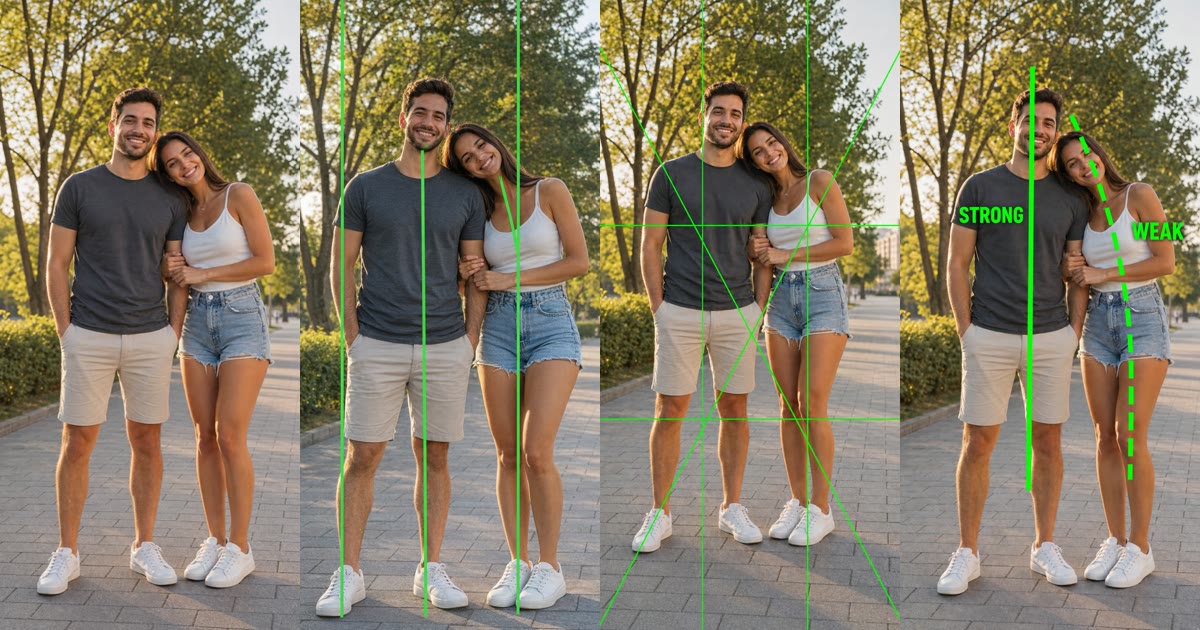
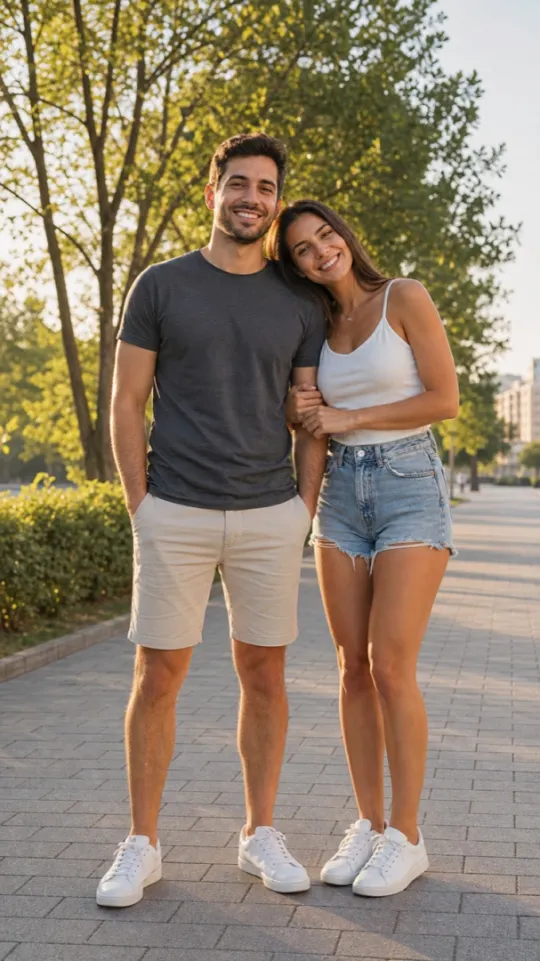
- Photo: one staged sample photo of a fictional couple (not real people) that ships with the Green Line Test iPhone app. He stands upright with his hands in his pockets; she rests her head on his shoulder and tilts her upper body toward him.
- How: the OpenAI API, not the ChatGPT app. The app can use different models and settings, so its answers may differ.
- Text test: GPT-5.5 (version gpt-5.5-2026-04-23), prompt "Do the green line test on this photo", run twice.
- Image test: three OpenAI image models (chatgpt-image-latest, gpt-image-2, gpt-image-2.5-sunburst), prompt "Do the green line test on this photo. Draw the green lines on it.", one run each.
- Dedicated tool: the same photo through Green Line Test's own prompt and model.
Test 1: asking a chat model to do it
GPT-5.5 answered in about ten seconds with text only. Both runs said his body line was "mostly vertical, with a slight lean toward her," that her line clearly tilted toward him, and that she was leaning in more. Neither run used the words "strong" or "weak," and both ended with a caveat that the test is a social-media trend, not a reliable read of a relationship.
That reading matches the photo. But nothing was drawn, so you cannot see where the lines would go or check them against the picture, which is the whole point of the trend.
Test 2: asking image models to draw the lines
Each image model returned a picture with green lines, and each drew something different:
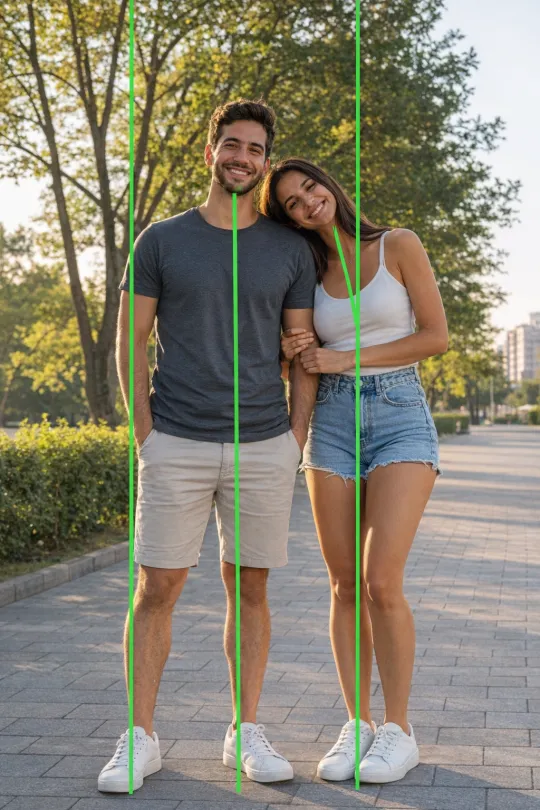
- chatgpt-image-latest drew three thin vertical lines from the top of the image to the bottom: one along his side, one through his middle, and one along her far side, plus a short curve from her neck. Her line is vertical, so the lean is not shown. It also returned a wider 2:3 frame instead of the original tall 9:16 one.
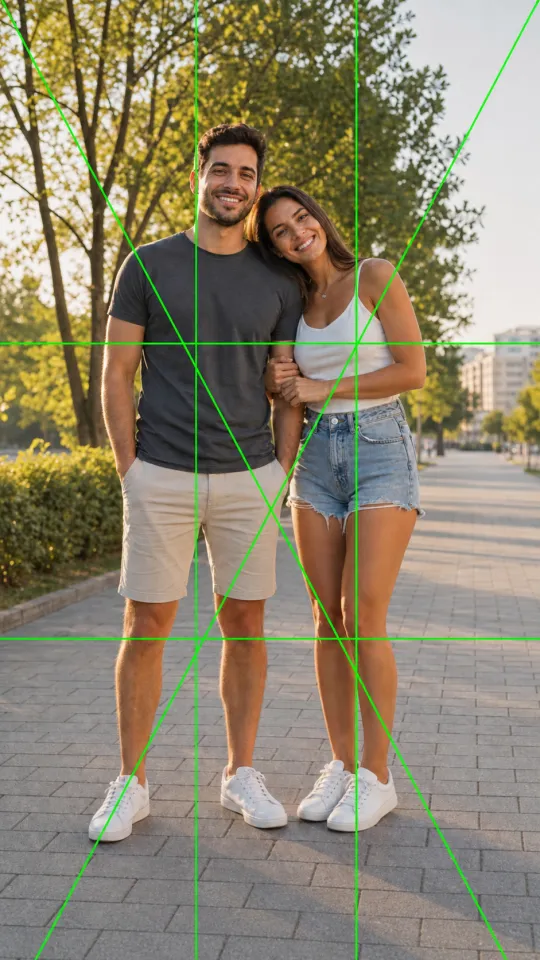
- gpt-image-2 drew a geometric grid over the whole photo: two vertical lines, two horizontal lines and a large X. These look like composition guides, not posture lines.
- gpt-image-2.5-sunburst drew a stick-figure skeleton on each person, with shoulder and hip bars, leg lines and a ground line. Her upper-body line does tilt toward him, so the lean is visible, but there is no single line per person and no verdict.
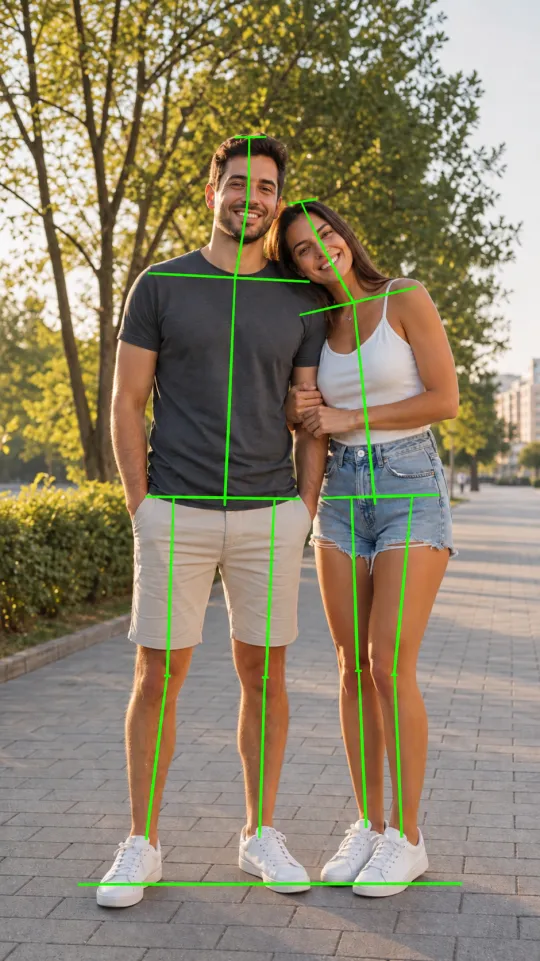
None added labels. None followed the format people share on TikTok, and you would need to know the trend already to read any of them.
What Green Line Test drew on the same photo
Green Line Test drew one solid vertical line labeled STRONG through the man and one dashed line, tilted along her lean, labeled WEAK on the woman, and nothing else. It took about 39 seconds. An earlier test of the same photo through the iPhone app, on October 1, 2026, produced the same layout.
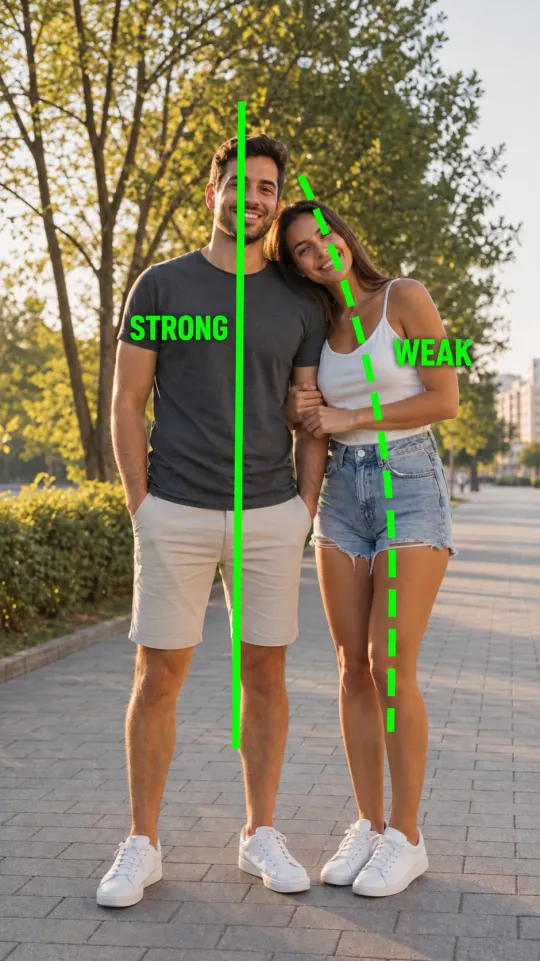
This run called Green Line Test's production prompt and model directly from a test script, rather than paying through the website or the app.
Can ChatGPT do the Green Line Test?
We did not test the ChatGPT app itself. Through the API, GPT-5.5 described the lean correctly without drawing it, and the image model named chatgpt-image-latest drew vertical lines that missed the woman's lean. If you try ChatGPT, describe exactly what you want: one straight line per person through the head and torso, solid if upright, dashed if leaning, with a label. Even then, check the lines against your photo.
Was Gemini tested?
No. We had no Gemini access set up for this test, so we cannot say what Gemini does with the Green Line Test. We will only add a Gemini result after running it.
Why a dedicated tool behaves differently
The difference is not a smarter AI. Green Line Test used the same model as the skeleton result above, gpt-image-2.5-sunburst. What changes is the instruction. "Green line test" is a meme, so a general model has to guess what it means. Green Line Test sends a fixed, detailed instruction with every photo:
- one straight line per person through the head and torso, never a curve following the spine
- judge the whole body axis, not a turned head, a hand on a shoulder, or a height difference
- solid vertical line with STRONG for upright; dashed tilted line with WEAK for leaning
- nothing else on the image: no grids, arrows, captions or verdict bubbles
That makes the output predictable. It does not make it a measurement. The lines are still drawn by an AI and can be off, which is why the app's result screen tells you to compare with your original.
Did the AI change the photo?
Every image result, Green Line Test's included, came back as a new image: the models generate a fresh picture rather than painting lines on top of the original pixels. Each result had a different size from the 607×1080 original, and one came back in a different frame shape. Green Line Test's instruction asks the model to keep the photo unchanged, but small details can still shift. If a face, hand or background looks different, use the original photo for anything that matters.
Privacy: where your photo goes
Every image result in this test was made by sending the photo to OpenAI, and Green Line Test works the same way: the photo goes to OpenAI to make the overlay, as its privacy policy explains. The same applies to any chatbot you upload a photo to. If you do not want a couple photo to leave your device, use the free method below in an offline photo editor, and ask the other person before uploading a photo of them anywhere.
The free way: no AI needed
You can do the whole test yourself in two minutes: draw one straight line per person from the center of the head through the torso, then compare each with vertical. The step-by-step guide is in how to draw the green lines by hand. It costs nothing, and you decide where the lines go.
Whatever draws the lines, read them lightly
A neat overlay can look scientific. It is not. Height, shoes, camera angle and posing move the lines more than feelings do, and the AI can place a line badly; see what can make the overlay itself wrong. Treat any result, AI or hand-drawn, as a joke to share, not a verdict on a relationship.
Try Green Line Test
To get the standard solid/dashed overlay without writing a long prompt, upload a photo at greenlinetest.app or use the Green Line Test iPhone app. Both are paid per analysis and meant for entertainment.